728x90

개요

이번에는 OAuth2 로그인 인증 인가 부분을 구현할 예정이다.

관련해서 세션 방식으로는 아래 블로그에 정리해두었고 이번에는 토큰으로 저장하는 방법이다.

Spring Security + OAuth2 + Session 를 사용한 로그인, 로그아웃 구현 - Kakao, Naver :: 미정 (tistory.com)


1. Oauth2 응답 객체


  • NaverResponse.java
public class NaverResponse implements OAuth2Response{

    private final Map<String, Object> attribute;

    public NaverResponse(Map<String, Object> attribute) {
        this.attribute = (Map<String, Object>) attribute.get("response");
        System.out.println("naver attributes: " + attribute);
    }

    @Override
    public String getProvider() {
        return "naver";
    }

    @Override
    public String getProviderId() {
        return attribute.get("id").toString();
    }

    @Override
    public String getEmail() {
        return attribute.get("email").toString();
    }

    @Override
    public String getName() {
        return attribute.get("name").toString();
    }

    @Override
    public Map<String, Object> getAttributes() {
        return attribute;
    }

}


  • KakaoResponse.java
public class KakaoResponse implements OAuth2Response{

    private Map<String, Object> attribute;

    public KakaoResponse(Map<String, Object> attribute) {
        this.attribute = attribute;
        System.out.println("Kakao attributes: " + attribute);
    }

    @Override
    public String getProvider() {
        return "kakao";
    }

    @Override
    public String getProviderId() {
        return attribute.get("id").toString();
    } // 2632890179

    @Override
    public String getEmail() {
        Map<String, Object> kakaoAccount = (Map<String, Object>) attribute.get("kakao_account");
        return kakaoAccount.get("email").toString();
    }

    @Override
    public String getName() {
        Map<String, Object> properties = (Map<String, Object>) attribute.get("properties");
        return properties.get("nickname").toString();
    }

    @Override
    public Map<String, Object> getAttributes() {
        return attribute;
    }
}


  • googleResponse.java
public class GoogleResponse implements OAuth2Response{

    private final Map<String, Object> attribute;

    public GoogleResponse(Map<String, Object> attribute) {
        this.attribute = attribute;
    }

    @Override
    public String getProvider() {
        return "google";
    }

    @Override
    public String getProviderId() {
        return attribute.get("sub").toString();
    }

    @Override
    public String getEmail() {
        return attribute.get("email").toString();
    }

    @Override
    public String getName() {
        return attribute.get("name").toString();
    }

    @Override
    public Map<String, Object> getAttributes() {
        return attribute;
    }
}


  • CustomOAuth2User.java
@Slf4j
public class CustomOAuth2User implements OAuth2User {

    private final OAuth2Response oAuth2Response;
    private final String role;

    public CustomOAuth2User(OAuth2Response oAuth2Response, String role) {
        this.oAuth2Response = oAuth2Response;
        this.role = role;
    }

    @Override
    public Map<String, Object> getAttributes() {

        return oAuth2Response.getAttributes();
    }

    // role에 해당하는 값
    @Override
    public Collection<? extends GrantedAuthority> getAuthorities() {
        Collection<GrantedAuthority> collection = new ArrayList<>();
        collection.add(new SimpleGrantedAuthority(role));
        return collection;
    }

    @Override
    public String getName() {
        return oAuth2Response.getName();
    }

    public String getUsername() {
        return oAuth2Response.getProvider()+" "+oAuth2Response.getProviderId();
    }

    /**
     * 각 소셜 로그인마다 OAuth2 제공자의 ID 형식이 다르기 때문에 각 ID에 맞는 처리
     * @return getProviderId
     * Google : 매우 큰 숫자 BigInt
     * Naver : 문자열 String
     * Kakao : 작은 숫자 Long
     */
    public Long getUserIdAsLong() {
        String providerId = oAuth2Response.getProviderId();

        if (providerId == null) {
            return null;
        }

        try {
            // providerId가 정수인지 확인
            if (providerId.matches("\\d+")) {
                BigInteger bigInt = new BigInteger(providerId);
                if (bigInt.compareTo(BigInteger.valueOf(Long.MAX_VALUE)) > 0) {
                    return Long.MAX_VALUE;
                } else if (bigInt.compareTo(BigInteger.valueOf(Long.MIN_VALUE)) < 0) {
                    return Long.MIN_VALUE;
                } else {
                    return bigInt.longValue();
                }
            } else {
                // providerId가 정수가 아닌 경우 문자열의 해시코드를 사용하여 Long으로 변환
                return (long) providerId.hashCode();
            }
        } catch (NumberFormatException e) {
            log.error("user ID parsing 오류 :: {}", providerId, e);
            return null;
        }
    }

    public List<String> getRoles() {
        return Collections.singletonList(role);
    }
}
  • 시큐리티 세션 방식처럼 UserDetails 역할을 하는 것
  • 카카오, 네이버, 구글 서비스로부터 받은 특정 사이트의 응답 값과 롤에 대한 값을 받는 클래스이다.
  • 이 클래스를 통해 특정 값과 롤에 대해 정의한다.


2. OAuth2UserService 구현

@Service
@RequiredArgsConstructor
@Slf4j
public class CustomOauth2UserService extends DefaultOAuth2UserService {

    private final UserRepository userRepository;
    private final RoleRepository roleRepository;

    @Override
    public OAuth2User loadUser(OAuth2UserRequest userRequest) throws OAuth2AuthenticationException {

        OAuth2User oAuth2User = super.loadUser(userRequest);
        log.info("OAuth2User attributes: {}", oAuth2User.getAttributes());
        String registrationId = userRequest.getClientRegistration().getRegistrationId();
        OAuth2Response oAuth2Response = null;

        switch (registrationId) {
            case "naver":
                log.info("naver 로그인");
                oAuth2Response = new NaverResponse(oAuth2User.getAttributes());
                break;
            case "kakao":
                log.info("kakao 로그인");
                oAuth2Response = new KakaoResponse(oAuth2User.getAttributes());
                break;
            case "google":
                log.info("google 로그인");
                oAuth2Response = new GoogleResponse(oAuth2User.getAttributes());
                break;
            default:
                log.error("로그인 실패: 지원하지 않는 로그인 제공자입니다. 등록 ID: {}", registrationId);
                throw new IllegalArgumentException("지원하지 않는 로그인 제공자입니다.");
        }

        String provider = oAuth2Response.getProvider();
        String providerId = oAuth2Response.getProviderId();
        String username = provider + " " + providerId; // 유저명 생성 (OAuth2 공급자명 + 공급자ID)

        Optional<User> userOptional = userRepository.findByUsername(username);

        if (userOptional.isPresent()) {
            // 기존 유저가 이미 존재하는 경우, 추가 작업 없이 바로 반환
            log.info("기존 유저 로그인: {}", username);
            return new CustomOAuth2User(oAuth2Response, userOptional.get().getRoles().stream().map(Role::getName).collect(Collectors.joining(",")));
        }

        // 새로운 유저에 대한 처리
        String roleName = "ROLE_USER";
        Optional<Role> roleOptional = roleRepository.findByName(roleName);
        Role role;
        if (roleOptional.isEmpty()) {
            role = new Role(roleName);
            role = roleRepository.save(role);
        } else {
            role = roleOptional.get();
        }

        User newUser = User.builder()
                .name(oAuth2Response.getName())
                .username(username)
                .roles(Set.of(role))
                .providerId(oAuth2Response.getProviderId())
                .provider(oAuth2Response.getProvider())
                .password("")
                // 마이페이지에서 직접 설정할 필드들
                .phoneNumber("01000000000")
                .birthdate(LocalDate.from(LocalDateTime.now()))
                .gender("여자")
                .registrationDate(LocalDateTime.now())
                .usernick(oAuth2Response.getEmail())
                .build();
        userRepository.save(newUser);

        log.info("새로운 유저 생성: {}", username);

        return new CustomOAuth2User(oAuth2Response, roleName);
    }
}
  • Spring Security의 OAuth2 인증을 처리하는 커스텀 서비스이다.
  • 주로 네이버, 카카오, 구글 등의 OAuth2 제공자에서 사용자 인증 정보를 받아와 데이터베이스에 저장하거나 업데이트하는 역할을 한다.
  • loadUser는 네이버나 카카오의 사용자 인증 정보를 받아오는 메서드이다.
  • 외부 사이트로부터 사용자 정보를 받아오고 그 값을 디비에 저장하는 클래스이다.


3. 성공 핸들러

@Component
@Slf4j
@RequiredArgsConstructor
public class CustomSuccessHandler extends SimpleUrlAuthenticationSuccessHandler {

    private final JwtTokenizer jwtTokenizer;
    private final RefreshTokenService refreshTokenService;
    private final UserRepository userRepository;

    @Override
    public void onAuthenticationSuccess(HttpServletRequest request, HttpServletResponse response, Authentication authentication) throws IOException, ServletException {
        try {
            CustomOAuth2User customUserDetails = (CustomOAuth2User) authentication.getPrincipal();

            String username = customUserDetails.getUsername();
            Optional<User> user = userRepository.findByUsername(username);

            if (user.isEmpty()) {
                System.out.println("유저기ㅏ 없어요");
                throw new UsernameNotFoundException("User not found with username: " + username);
            }
            Long userId = user.get().getId();
            System.out.println("userId :: " + userId);
            String name = customUserDetails.getName();
            List<String> roles = customUserDetails.getRoles();

            log.info("Oauth2 로그인 성곻했습니다. ");
            log.info("jwt 토큰 생성 :: userId: {}, username: {}, name: {}, roles: {}", userId, username, name, roles);

            String accessToken = jwtTokenizer.createAccessToken(userId, username, name, roles);
            String refreshToken = jwtTokenizer.createRefreshToken(userId, username, name, roles);

            log.info("Access Token :: {}", accessToken);
            log.info("Refresh Token :: {}", refreshToken);

            // 쿠키에 토큰 저장
            Cookie accessTokenCookie = new Cookie("accessToken", accessToken);
            accessTokenCookie.setHttpOnly(true);
            accessTokenCookie.setPath("/");
            accessTokenCookie.setMaxAge(Math.toIntExact(jwtTokenizer.ACCESS_TOKEN_EXPIRE_COUNT / 1000));

            Cookie refreshTokenCookie = new Cookie("refreshToken", refreshToken);
            refreshTokenCookie.setHttpOnly(true);
            refreshTokenCookie.setPath("/");
            refreshTokenCookie.setMaxAge(Math.toIntExact(jwtTokenizer.REFRESH_TOKEN_EXPIRE_COUNT / 1000));

            response.addCookie(accessTokenCookie);
            response.addCookie(refreshTokenCookie);

            // 리프레시 토큰 DB 저장
            Date date = new Date(System.currentTimeMillis() + jwtTokenizer.REFRESH_TOKEN_EXPIRE_COUNT);
            RefreshToken refreshTokenEntity = new RefreshToken();
            refreshTokenEntity.setValue(refreshToken);
            refreshTokenEntity.setUserId(userId);
            refreshTokenEntity.setExpiration(date.toString());

            refreshTokenService.addRefreshToken(refreshTokenEntity);

            // 추가 정보가 없을 때만 oauthPage로 리다이렉트
            if (user.get().getPhoneNumber().equals("01000000000")) {
                response.sendRedirect("/oauthPage");
            } else {
                response.sendRedirect("/my"); // 이미 추가 정보가 있을 경우 메인 페이지로 리다이렉트
            }

        } catch (Exception e) {
            log.error("Oauth2 로그인에 실패했습니다.", e);
            if (!response.isCommitted()) {
                response.sendError(HttpServletResponse.SC_INTERNAL_SERVER_ERROR, "An error occurred during authentication");
            }
        }
    }
}
  • 나머지는 기존 세션 방식의 소셜로그인과 동일하다면 jwt 토큰 발급에서는 이 부분이 필요하다.
  • 로그인에 성공하면 jwt 토큰을 발급해줘야 하기 때문이다.


4.SecurityConfig

@Configuration
@EnableWebSecurity
@RequiredArgsConstructor
public class SecurityConfig {

    private final CustomAuthenticationEntryPoint customAuthenticationEntryPoint;
    private final JwtBlacklistService jwtBlacklistService;
    private final RefreshTokenService refreshTokenService;
    private final JwtTokenizer jwtTokenizer;
    private final CustomOauth2UserService customOAuth2UserService;
    private final CustomSuccessHandler customSuccessHandler;

    // 모든 유저 허용 페이지
    String[] allAllowPage = new String[] {
            "/",        // 메인페이지
            "/signup", // 회원가입 페이지
            "/signin", // 로그인 페이지
            "/css/**", "/js/**", "/files/**", // css, js, 이미지 url
            "/api/users/login", // 로그인 페이지
            "/api/users/signup", // 회원가입 페이지
            "/api/users/mail","/api/users/verify-code", "/api/users/check-email","/api/users/check-usernick", // 인증 메일 페이지
            "/oauth2/**", "/login/oauth2/**", // OAuth2 로그인 허용
            "/api/users/randomNickname", // 랜덤 닉네임 생성
            "/api/users/reset-password", "/api/users/verify-temporary-password", "/my/change-password" // 임시 비밀번호 발급
    };

    // 관리자 페이지
    String[] adminAllowPage = new String[] {
            "/admin",
            "/admin/**"
    };

    @Bean
    public SecurityFilterChain securityFilterChain(HttpSecurity http) throws Exception {
        http
                .authorizeRequests(authorize -> authorize
                        .requestMatchers(allAllowPage).permitAll()
                        .requestMatchers(adminAllowPage).hasRole("ADMIN")
                        .anyRequest().authenticated()
                )
                .addFilterBefore(new JWTFilter(jwtTokenizer, jwtBlacklistService, refreshTokenService), UsernamePasswordAuthenticationFilter.class) // JWT 필터 사용
                .formLogin(form -> form.disable()) // 로그인 폼 비활성화
                .sessionManagement(sessionManagement -> sessionManagement.sessionCreationPolicy(SessionCreationPolicy.STATELESS)) // 세션 관리 Stateless 설정(서버가 클라이언트 상태 저장x)
                .csrf(csrf -> csrf.disable()) // cors 허용
                .httpBasic(httpBasic -> httpBasic.disable()) // http 기본 인증(헤더) 비활성화
                .cors(cors -> cors.configurationSource(configurationSource()))
                .exceptionHandling(exception -> exception
                        .authenticationEntryPoint(customAuthenticationEntryPoint)
                )
                .oauth2Login(oauth2 -> oauth2
                        .loginPage("/signin")
                        .userInfoEndpoint(userInfoEndpointConfig -> userInfoEndpointConfig.userService(customOAuth2UserService))
                        .successHandler(customSuccessHandler)
                        .failureUrl("/loginFailure")
                        .authorizationEndpoint(authorization -> authorization.baseUri("/oauth2/authorization"))
                        .permitAll()
                );
        return http.build();
    }

    @Bean
    public PasswordEncoder passwordEncoder(){
        return new BCryptPasswordEncoder();
    }

    @Bean
    public CorsConfigurationSource configurationSource(){
        UrlBasedCorsConfigurationSource source = new UrlBasedCorsConfigurationSource();
        CorsConfiguration config = new CorsConfiguration();
        config.addAllowedOriginPattern("*"); // 모든 도메인 허용
        config.addAllowedOrigin("http://localhost:3000"); // 프론트의 주소
        config.addAllowedOrigin("*");
        config.addAllowedHeader("*");
        config.addAllowedMethod("*");
        config.setAllowedMethods(List.of("GET", "POST", "DELETE"));
        config.setExposedHeaders(Arrays.asList("Set-Cookie", "Authorization"));
        config.setAllowCredentials(true);
        source.registerCorsConfiguration("/**", config);
        return source;
    }
}
  • OAuth2 설정을 해준다.

그럼 JWT + OAuth2 + Security 에 대한 인증/인가는 끝이 났다.

728x90
728x90

개요

이번에는 구글 OAuth2 로그인에 대해서 작성해볼려고 한다. 


Spring Security + OAuth2 + Session 를 사용한 로그인, 로그아웃 구현 - Kakao, Naver :: 미정 (tistory.com)


Spring Security + OAuth2 + Session 를 사용한 로그인, 로그아웃 구현 - Kakao, Naver

개요시큐리티를 사용해 OAuth2 로그인을 진행하고자 한다. 나는 그중 카카오와 네이버에 대해 해보겠다.앞에서 진행한 코드를 그대로 사용해서 이어서 진행한다. Spring Security + Session 를 사용한

eesko.tistory.com

위 코드를 그대로 사용할 예정이다.


구글 소셜 로그인 신청

일단 구글 관련해서는 다루지 않을 것이고 이 부분은 다른 블로그를 찾아보면 된다.


나의 환경

Window 11

intelliJ

java 21 

spring Boot 3.3.0

spring Security 6

oauth2


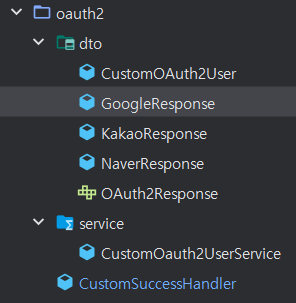
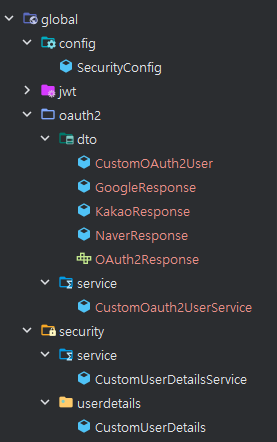
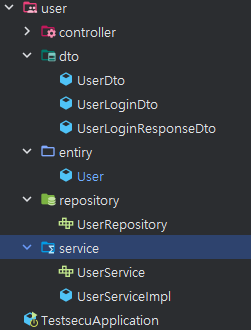
프로젝트 파일 구조


의존성 설치

  • Build.gradle
	// OAuth2 Client
    implementation 'org.springframework.boot:spring-boot-starter-oauth2-client'
  • Build.gradle 에 security와 OAuth2 의존성을 추가해준다.


  • Application.yml
spring:
  application:
    name: [projectname]

  datasource:
    url: jdbc:mysql://localhost:3306/[db]
    username: [usernmae]
    password: [password]
    driver-class-name: com.mysql.cj.jdbc.Driver

  jpa:
    hibernate:
      ddl-auto: update
    show-sql: false
    properties:
      hibernate:
        dialect: org.hibernate.dialect.MySQLDialect

  security:
    oauth2:
      client:
        registration:
          google:
            client-id: [client-id]
            client-secret: [client-secre]
            client-name: google
            authorization-grant-type: authorization_code
            redirect-uri: http://localhost:8080/login/oauth2/code/google
            scope:
              - profile
              - email
server:
  port: 8080
  • application.yml 파일에 OAuth2 설정을 해준다. 
  • 구글같은 경우 provider 부분은 스프링에서 알아서 제공해줘서 작성안해줘도 된다.


1. GoogleResponse

getAttributes :
{
	resultcode=00,
    	message=success,
      	id=12345678,
        email=엉이@naver.com,
      	name=엉이
   	}
 }
 
 provider : google

구글 같은 경우 응답 방식인 response 가 위와 같이 나온다. 저거에 맞게 커스텀하면 된다.

public class GoogleResponse implements OAuth2Response{

    private final Map<String, Object> attribute;

    public GoogleResponse(Map<String, Object> attribute) {

        this.attribute = attribute;
    }

    @Override
    public String getProvider() {

        return "google";
    }

    @Override
    public String getProviderId() {

        return attribute.get("sub").toString();
    }

    @Override
    public String getEmail() {

        return attribute.get("email").toString();
    }

    @Override
    public String getName() {

        return attribute.get("name").toString();
    }


    @Override
    public Map<String, Object> getAttributes() {
        return attribute;
    }
}

각 소셜 플랫폼마다 웅답 방식이 다르기 때문에 인터페이스를 구현했고 구글 로그인을 위해 내가 만든 인터페이스를 상속하는 방식으로 진행했다. 이 부분은 이전 게시글을 보면 된다.


2. OAuth2UserService 구현

@Service
@RequiredArgsConstructor
@Slf4j
public class CustomOauth2UserService extends DefaultOAuth2UserService {

    private final UserRepository userRepository;
    private final RoleRepository roleRepository;

    @Override
    public OAuth2User loadUser(OAuth2UserRequest userRequest) throws OAuth2AuthenticationException {

        OAuth2User oAuth2User = super.loadUser(userRequest);
        System.out.println("OAuth2User attributes: " + oAuth2User.getAttributes());
        String registrationId = userRequest.getClientRegistration().getRegistrationId();
        OAuth2Response oAuth2Response = null;

        switch (registrationId) {
            case "naver":
                log.info("naver 로그인");
                oAuth2Response = new NaverResponse(oAuth2User.getAttributes());
                break;

            case "kakao":
                log.info("kakao 로그인");
                oAuth2Response = new KakaoResponse(oAuth2User.getAttributes());
                break;

            case "google":
                log.info("google 로그인");
                oAuth2Response = new GoogleResponse(oAuth2User.getAttributes());
                break;

            default:
                log.error("로그인 실패: 지원하지 않는 로그인 제공자입니다. 등록 ID: {}", registrationId);
                throw new IllegalArgumentException("지원하지 않는 로그인 제공자입니다.");
        }


        String provider = oAuth2Response.getProvider();
        String providerId = oAuth2Response.getProviderId();

        String name = provider + " " + providerId; // 이렇게 해서 해당 유저가 이미 디비에 있는지 없는지 확인
        Optional<User> userOptional = userRepository.findByUsername(name);

        // "USER" 라는 역할을 OAuth2 로그인 사람에게 다 부여
        String roleName = "ROLE_USER";
        Optional<Role> roleOptional = roleRepository.findByName(roleName); // 디비에서 찾아오는데,
        Role role;
        if (roleOptional.isEmpty()) { // "USER" 디비에 없다면
            role = new Role(roleName); // 새로운 역할 등록
            role = roleRepository.save(role);
        } else {
            role = roleOptional.get(); // 그게 아니라면 역할 꺼내오기
        }

        String password = String.valueOf(UUID.randomUUID());

        User user;
        // OAuth2 로그인을 한 적 없는 사람
        if (userOptional.isEmpty()) {
            user = User.builder()
                    .name(oAuth2Response.getEmail())
                    .username(name)
                    .roles(Set.of(role))
                    .providerId(oAuth2Response.getProviderId())
                    .provider(oAuth2Response.getProvider())
                    .password(password)
                    .phoneNumber("default")
                    .birthdate(LocalDate.from(LocalDateTime.now()))
                    .gender("default")
                    .registrationDate(LocalDateTime.now())
                    .usernick(oAuth2Response.getName())
                    .build();
            userRepository.save(user);
        } else { // 이미 OAuth2 로그인을 한 적이 있는 사람
            user = userOptional.get();
            boolean updated = false;

            if (!user.getRoles().contains(role)) {
                user.getRoles().add(role);
                updated = true;
            }

            // 닉네임은 첫 로그인 이후 마이페이지에서만 변경 가능
            if (!user.getUsernick().equals(oAuth2Response.getName()) && user.getUsernick() == null) {
                user.setUsernick(oAuth2Response.getName());
                updated = true;
            }

            if (updated) {
                userRepository.save(user);
            }
        }

        System.out.println("User saved: " + user);

        // 특정 사이트의 응답 값과 역할을 받는 CustomOAuth2User 클래스
        // 로그인 한적 없는 사람은 "USER" 역할, 기존에 한 적있다면 그 사람이 현재 갖고 있는 역할을 CustomOAuth2User 클래스로 반환
        return new CustomOAuth2User(oAuth2Response, roleName);
    }
}
  • Spring Security의 OAuth2 인증을 처리하는 커스텀 서비스이다.
  • 주로 네이버, 카카오, 구글 등의 OAuth2 제공자에서 사용자 인증 정보를 받아와 데이터베이스에 저장하거나 업데이트하는 역할을 한다.
  • loadUser 메서드는 네이버나 카카오 등 소셜플랫폼의 사용자 인증 정보를 받아오는 메서드이다.
  • 위 클래스는 외부 사이트로부터 사용자 정보를 받아오고 그 값을 디비에 저장하는 클래스이다.


3. 로그인 폼 및 로그인 한 회원의 정보를 보여주기

  • loginform.html
<!DOCTYPE html>
<html>
<head>
    <meta charset="UTF-8">
    <title>로그인 페이지</title>
</head>
<body>
<h1>로그인 페이지</h1>
<hr/>
<!-- 시큐리티는 x-www-form-url-encoded 타입만 인식 -->
<form action="/login" method="post">
    <input type="text" name="username" />
    <input type="password" name="password" />
    <button>로그인</button>
</form>
<a href="/oauth2/authorization/kakao">카카오 로그인</a>
<a href="/oauth2/authorization/naver">네이버 로그인</a>
<a href="/oauth2/authorization/google">구글 로그인</a>
<a href="/api/users/signup">회원가입을 아직 하지 않으셨나요?</a>
</body>
</html>


이렇게 하면 기본 Oauth2 세션 로그인은 성공할 것이다. 시큐리티 관련 설정은 이전 게시글에서 다뤘기 때문에 여기서 따로 적지는 않을 것이다.

다음 포스터에서는 모든 소셜로그인에서  jwt를 사용해서 구현해볼 것이다.


728x90
728x90

개요

시큐리티를 사용해 OAuth2 로그인을 진행하고자 한다. 나는 그중 카카오와 네이버에 대해 해보겠다.

앞에서 진행한 코드를 그대로 사용해서 이어서 진행한다. 

Spring Security + Session 를 사용한 회원가입, 로그인, 로그아웃 구현 :: 미정 (tistory.com)


OAuth2 에 대한 설명은 

Spring : OAuth2 로그인 방식 :: 미정 (tistory.com) 


Spring : OAuth2 로그인 방식

OAuth 2.0 이란?서비스에서 사용자 개인정보와 인증에 대한 책임을 지지 않고 신뢰할 만한 타사 플랫폼에 위임개인정보 관련 데이터를 직접 보관하는 것은 리스크가 크며 보안적으로 문제되지 않

eesko.tistory.com

이걸 보면 된다.


네이버, 카카오 소셜 로그인 신청

나는 네이버와 카카오에 대해서 신청을 했고

이 분의 영상을 보고 네이버에 대한 신청은 했다. 

https://youtu.be/L8yAtjjOhDo?feature=shared


카카오 신청은 이 분의 글을 보고 신청 했다.

[Spring Boot] 로그인 기능 구현 (6) - 카카오 로그인 (OAuth 2.0) — 공대생의 코딩 일기 (tistory.com)


나의 환경

Window 11

intelliJ

java 21 

spring Boot 3.3.0

spring Security 6

oauth2


프로젝트 파일 구조


의존성 설치

  • Build.gradle
	// OAuth2 Client
    implementation 'org.springframework.boot:spring-boot-starter-oauth2-client'

    // security
    implementation 'org.springframework.boot:spring-boot-starter-security'
    implementation 'org.thymeleaf.extras:thymeleaf-extras-springsecurity6'

    implementation 'org.springframework.boot:spring-boot-starter-data-jpa'
    implementation 'org.springframework.boot:spring-boot-starter-thymeleaf'
    runtimeOnly 'com.mysql:mysql-connector-j'
    implementation 'org.springframework.boot:spring-boot-starter-data-jdbc'
    implementation 'org.springframework.boot:spring-boot-starter-web'
    compileOnly 'org.projectlombok:lombok'
    developmentOnly 'org.springframework.boot:spring-boot-devtools'
    annotationProcessor 'org.projectlombok:lombok'

    testImplementation 'org.springframework.boot:spring-boot-starter-test'
    testRuntimeOnly 'org.junit.platform:junit-platform-launcher'

    //타임리프에서 스프링시큐리티를 쓸수있게.
    implementation 'org.thymeleaf.extras:thymeleaf-extras-springsecurity6:3.1.2.RELEASE'
    implementation 'org.jsoup:jsoup:1.14.3'

    //validation사용
    implementation 'jakarta.validation:jakarta.validation-api:3.0.2'
  • Build.gradle 에 security와 OAuth2 의존성을 추가해준다.


  • Application.yml
spring:
  application:
    name: [projectname]

  datasource:
    url: jdbc:mysql://localhost:3306/[db]
    username: [usernmae]
    password: [password]
    driver-class-name: com.mysql.cj.jdbc.Driver

  jpa:
    hibernate:
      ddl-auto: update
    show-sql: false
    properties:
      hibernate:
        dialect: org.hibernate.dialect.MySQLDialect

  security:
    oauth2:
      client:
        registration:
          kakao:
            client-id: [설정]
            client-secret: [설정]
            scope:
              - account_email
              - profile_nickname
            authorization-grant-type: authorization_code
            redirect-uri: http://localhost:8080/login/oauth2/code/kakao
            client-name: Kakao
            client-authentication-method: client_secret_post

          naver:
            client-id: [설정]
            client-secret: [설정]
            redirect-uri: http://localhost:8080/login/oauth2/code/naver
            client-name: Naver
            authorization-grant-type: authorization_code
            scope:
              - name
              - email

        provider:
          kakao:
            authorization-uri: https://kauth.kakao.com/oauth/authorize
            token-uri: https://kauth.kakao.com/oauth/token
            user-info-uri: https://kapi.kakao.com/v2/user/me
            user-name-attribute: id
          naver:
            authorization_uri: https://nid.naver.com/oauth2.0/authorize
            token_uri: https://nid.naver.com/oauth2.0/token
            user-info-uri: https://openapi.naver.com/v1/nid/me
            user_name_attribute: response

server:
  port: 8080
  • application.yml 파일에 OAuth2 설정을 해준다. 
  • 위에서 신청한 네이버와 카카오 설정들을 맞게 설정해준다.


1. 엔티티 수정

  • User.java
@Entity
@Table(name = "users")
@Getter @Setter
public class User {

    @Id @GeneratedValue(strategy = GenerationType.IDENTITY)
    private Long id;

    @Column(nullable = false, unique = true)
    private String email;

    @Column(nullable = false)
    private String password;

    @Column(nullable = false)
    private String username;

    @Column(nullable = false)
    private String usernick;

    @Column(name = "registrationDate", nullable = false)
    private LocalDateTime registrationDate  = LocalDateTime.now();

    private String filename;
    private String filepath;

    @ManyToMany(fetch = FetchType.EAGER)
    @JoinTable(name = "user_roles",
    joinColumns = @JoinColumn(name = "user_id"),
    inverseJoinColumns = @JoinColumn(name = "role_id"))
    private Set<Role> roles = new HashSet<>();
    
    /**
     * Oauth2 관련
     */
    // providerId : 구굴,카카오,네이버 로그인 한 유저의 고유 ID가 들어감
    private String loginId; // Unique identifier for OAuth users

    // provider : google, kakao, naver 이 들어감
    private String provider;
}
  • 아래 2개의 칼럼을 추가해준다.
  • 그리고 위의 엔티티는 최종이고 아래 부분은 이전 엔티티에서 닉네임 컬럼 부분을 보면 usernick이 중복 불가능하게 했지만 그 부분을 수정해줬다.
  • 하지만 현재 디비에 값들이 저장된 상태라서 엔티티에서 변경을 한후 sql 구문을 통해 수정해줬다.
// 변경 전
@Column(nullable = false, unique = true)
private String usernick;

// 변경 후 
@Column(nullable = false)
private String usernick;
# 1 
SHOW INDEX FROM users WHERE Column_name = 'usernick';

# 2 Key_name 의 값을 확인

# 3
ALTER TABLE users DROP INDEX UK5rqu0cqcxxar2go1qlddeia02;


2. Oauth2 응답 객체

  • OAuth2Response.java
public interface OAuth2Response {

    //제공자 (Ex. naver, google, ...)
    String getProvider();

    //제공자에서 발급해주는 아이디(번호)
    String getProviderId();

    //이메일
    String getEmail();

    //사용자 실명 (설정한 이름)
    String getName();
}
  • 각 사이트마다 인증 데이터 규격이 다르기 때문에 OAuth2Response 인터페이스를 만들어 구별한다.
  • 카카오, 구글, 네이버, 깃허브 등등 이 인터페이스를 상속받아 각각의 규격에 맞게 구현한다.
  • 현재 나는 사용자 이메일, 설정 이름만 가져왔고 프로필 이미지, 생일 등등 가져올 수 있다.


Q. 여기서 잠깐!

  • 네이버와 카카오, 구글의 사용자 정보 response 를 보자.
getAttributes : 
{
	id=12345678, 
	connected_at=2024-07-26T09:56:54Z, 
	properties={
    	nickname=엉이
    }, 
	kakao_account={
    	profile_nickname_needs_agreement=false, 
                             profile={nickname=엉이, is_default_nickname=false},
                             has_email=true, 
                             email_needs_agreement=false, 
                             is_email_valid=true, 
                             is_email_verified=true, 
                             email=엉이@kakao.com
    }
}

 provider : kakao
getAttributes :
{
	resultcode=00,
    	message=success,
    	response={
      	id=12345678,
        email=엉이@naver.com,
      	name=엉이
   	}
 }
 
 provider : naver
getAttributes :
{
	resultcode=00,
    	message=success,
      	id=12345678,
        email=엉이@naver.com,
      	name=엉이
   	}
 }
 
 provider : google
  • 각 사이트마다 출력 값들이 다르다.
  • 그러기 때문에 기본적인 형태가 다르기 때문에 위에서 만든 OAuth2Response 인터페이스를 만들어서 네이버, 카카오 응답 객체에 맞게 고칠 수 있도록 기본적인 틀을 만들어 둔다.
  • 그럼 카카오, 네이버, 구글 등 OAuth2Response 인터페이스를 상속받아서 구현하면 된다.


  • KakaoResponse.java
getAttributes : 
{
	id=12345678, 
	connected_at=2024-07-26T09:56:54Z, 
	properties={
    	nickname=엉이
    }, 
	kakao_account={
    	profile_nickname_needs_agreement=false, 
                             profile={nickname=엉이, is_default_nickname=false},
                             has_email=true, 
                             email_needs_agreement=false, 
                             is_email_valid=true, 
                             is_email_verified=true, 
                             email=엉이@kakao.com
    }
}

 provider : kakao

위의 출력값을 보면서 아래 코드를 이해하자.

public class KakaoResponse implements OAuth2Response{

    private Map<String, Object> attribute;

    public KakaoResponse(Map<String, Object> attribute) {
        this.attribute = attribute;
        System.out.println("Kakao attributes: " + attribute);
    }

    @Override
    public String getProvider() {
        return "kakao";
    }

    @Override
    public String getProviderId() {
        return attribute.get("id").toString();
    }

    @Override
    public String getEmail() {
        Map<String, Object> kakaoAccount = (Map<String, Object>) attribute.get("kakao_account");
        return kakaoAccount.get("email").toString();
    }

    @Override
    public String getName() {
        Map<String, Object> properties = (Map<String, Object>) attribute.get("properties");
        return properties.get("nickname").toString();
    }
}
  • 카카오는 출력 데이터 내부 안에 kakao_account 라는 데이터가 존재하고 그 안에 사용자 이메일, 이름 등에 대한 값이 있기 때문에 get()으로 값을 꺼내온다.


  • NaverResponse.java
getAttributes :
{
	resultcode=00,
    	message=success,
    	response={
      	id=12345678,
        email=엉이@naver.com,
      	name=엉이
   	}
 }
 
 provider : naver

위의 출력값을 보면서 아래 코드를 이해하자.

public class NaverResponse implements OAuth2Response{

    private final Map<String, Object> attribute;

    public NaverResponse(Map<String, Object> attribute) {
        this.attribute = (Map<String, Object>) attribute.get("response");
        System.out.println("naver attributes: " + attribute);
    }

    @Override
    public String getProvider() {
        return "naver";
    }

    @Override
    public String getProviderId() {
        return attribute.get("id").toString();
    }

    @Override
    public String getEmail() {
        return attribute.get("email").toString();
    }

    @Override
    public String getName() {
        return attribute.get("name").toString();
    }
}
  • 네이버는 데이터 내부 안에  response 라는 데이터가 또 있고 그 안에 사용자의 정보에 대한 값이 저장되어 있기 때문에 get으로 가져와준다.


  • googleResponse.java
getAttributes :
{
	resultcode=00,
    	message=success,
      	id=12345678,
        email=엉이@naver.com,
      	name=엉이
   	}
 }
 
 provider : google
public class GoogleResponse implements OAuth2Response{

    private final Map<String, Object> attribute;

    public GoogleResponse(Map<String, Object> attribute) {
        this.attribute = attribute;
        System.out.println("google attributes: " + attribute);
    }

    @Override
    public String getProvider() {
        return "google";
    }

    @Override
    public String getProviderId() {
        return attribute.get("sub").toString();
    }

    @Override
    public String getEmail() {
        return attribute.get("email").toString();
    }

    @Override
    public String getName() {
        return attribute.get("name").toString();
    }
}

구글에 대해서는 카드 인증이 필요해서 귀찮기 때문에.. 하지는 않았지만 정리를 위해 작성했다. 실제 구글 oauth2는 신청하지 않았기에 사용하지 않았다.


3. OAuth2User

  • CustomOAuth2User.java
public class CustomOAuth2User implements OAuth2User {

    private final OAuth2Response oAuth2Response;
    private final String role;

    public CustomOAuth2User(OAuth2Response oAuth2Response, String role) {
        this.oAuth2Response = oAuth2Response;
        this.role = role;
    }

	// 현재는 null 했지만 이 값을 지정하면 
    // 카카오,네이버 등 로그인했으면 거기에 맞는 프로필 사진이나 가져올 수 있음
    @Override
    public Map<String, Object> getAttributes() {
        return null;
    }

	// role에 해당하는 값
    @Override
    public Collection<? extends GrantedAuthority> getAuthorities() {
        Collection<GrantedAuthority> collection = new ArrayList<>();
        collection.add(new SimpleGrantedAuthority(role));
        return collection;
    }
    
    @Override
    public String getName() {
        return oAuth2Response.getName();
    }

	// 사용안함
    public String getUsername() {
        return oAuth2Response.getProvider()+" "+oAuth2Response.getProviderId();
    }
}
  • 카카오, 네이버, 구글 서비스로부터 받은 특정 사이트의 응답 값과 롤에 대한 값을 받는 클래스이다. 
  • 이 클래스를 통해 특정 값과 롤에 대해 정의한다.


4. SecurityConfig

@Configuration
@EnableWebSecurity
@RequiredArgsConstructor
public class SecurityConfig {

    private final CustomUserDetailsService customUserDetailsService; // 기본 세션 로그인
    private final CustomOauth2UserService customOAuth2UserService; // OAuth2 등록

    @Bean
    public SecurityFilterChain securityFilterChain(HttpSecurity http) throws Exception {
        http
                .authorizeRequests(authorize -> authorize
                        .requestMatchers("/api/users/signup", "/api/users/login").permitAll()
                        .requestMatchers("/oauth-login/admin").hasRole("ADMIN")
                        .requestMatchers("/oauth-login/info").authenticated()
                        .anyRequest().authenticated()
                )
                .formLogin(form -> form
                        .loginPage("/api/users/login") // 로그인 페이지의 경로
                        .loginProcessingUrl("/login") // 로그인 폼이 제출되는 URL
                        .defaultSuccessUrl("/api/users/home")
                        .permitAll()
                )
                .logout(logout -> logout
                        .logoutUrl("/logout")
                        .logoutSuccessUrl("/")
                )
                .sessionManagement(sessionManagement -> sessionManagement
                        .maximumSessions(1)
                        .maxSessionsPreventsLogin(true)
                )
                .userDetailsService(customUserDetailsService)
                .csrf(csrf -> csrf.disable())
                .cors(httpSecurityCorsConfigurer -> httpSecurityCorsConfigurer.configurationSource(configurationSource()))
                // OAuth 등록
               .oauth2Login(oauth2 -> oauth2
                        .loginPage("/api/users/login") // 커스텀 로그인 방식 지정
                        // customOAuth2UserService 등록
                        .userInfoEndpoint(userInfoEndpointConfig ->
                                userInfoEndpointConfig.userService(customOAuth2UserService))
                        .failureUrl("/loginFailure")
                        .defaultSuccessUrl("/api/users/info")
                        .authorizationEndpoint(authorization -> authorization
                                .baseUri("/oauth2/authorization")
                        )
                        .permitAll()
                );
        return http.build();
    }

    @Bean
    public PasswordEncoder passwordEncoder(){
        return new BCryptPasswordEncoder();
    }

    public CorsConfigurationSource configurationSource(){
        UrlBasedCorsConfigurationSource source = new UrlBasedCorsConfigurationSource();
        CorsConfiguration config = new CorsConfiguration();
        config.addAllowedOrigin("*");
        config.addAllowedHeader("*");
        config.addAllowedMethod("*");
        config.setAllowedMethods(List.of("GET","POST","DELETE"));
        source.registerCorsConfiguration("/**",config);
        return source;
    }
}
  • Oauth2 설정을 해준다.


5. OAuth2UserService 구현

  • OAuth2UserService.java
@Service
@RequiredArgsConstructor
@Slf4j
public class CustomOauth2UserService extends DefaultOAuth2UserService {
    // DefaultOAuth2UserService는 OAuth2UserService의 구현체라서 
    // DefaultOAuth2UserService 또는 OAuth2UserService 아무거나 상속해도 된다.

    private final UserRepository userRepository;
    private final RoleRepository roleRepository;
	
    // loadUser --> 네이버나 카카오의 사용자 인증 정보를 받아오는 메서드
    // userRequest 를 통해 카카오, 네이버, 구글 등등 인증 데이터가 넘어 올 것이다.
    @Override
    public OAuth2User loadUser(OAuth2UserRequest userRequest) throws OAuth2AuthenticationException {

        OAuth2User oAuth2User = super.loadUser(userRequest);

        System.out.println("OAuth2User attributes: " + oAuth2User.getAttributes());
  		
        // 네이버, 구글, 깃허브 등등 어떤 어떤 인증 값인지 구별하기 위해 인증 제공자를 구분
        String registrationId = userRequest.getClientRegistration().getRegistrationId();
        
        // 각 사이트마다 인증 데이터 규격이 다르기 때문에 OAuth2Response 를 만들어 구별
        // 인증 제공자에 따라 OAuth2Response를 생성
        OAuth2Response oAuth2Response = null;
        
        // 그 값이 네이버면
        if (registrationId.equals("naver")) {
            log.info("naver 로그인");
            oAuth2Response = new NaverResponse(oAuth2User.getAttributes());
      	// 그 값이 카카오면
        } else if (registrationId.equals("kakao")) {
            log.info("kakao 로그인");
            oAuth2Response = new KakaoResponse(oAuth2User.getAttributes());
        // 둘다 아니면
        } else {
            System.out.println("로그인 실패");
            throw new IllegalArgumentException("지원하지 않는 로그인 제공자입니다.");
        }

        // 데이터 베이스 저장 관련 구현
        
        String provider = oAuth2Response.getProvider();
        String providerId = oAuth2Response.getProviderId();

        String username = provider + " " + providerId;
        Optional<User> userOptional = userRepository.findByUsername(username);

        String roleName = "USER";
        Optional<Role> roleOptional = roleRepository.findByName(roleName);
        Role role;
        if (roleOptional.isEmpty()) {
            role = new Role(roleName);
            role = roleRepository.save(role);  // Save the new role and get the persisted instance
        } else {
            role = roleOptional.get();
        }

        User user;
        if (userOptional.isEmpty()) {
            user = User.builder()
                    .username(username)
                    .email(oAuth2Response.getEmail())
                    .roles(Set.of(role))
                    .loginId(oAuth2Response.getProviderId())
                    .provider(oAuth2Response.getProvider())
                    .password("defaultPassword")
                    .registrationDate(LocalDateTime.now())
                    .usernick(oAuth2Response.getName())
                    .build();
            userRepository.save(user);
        } else {
            user = userOptional.get();
            user.setUsername(username);
            user.setEmail(oAuth2Response.getEmail());
            user.setLoginId(oAuth2Response.getProviderId());
            user.setProvider(oAuth2Response.getProvider());
            user.getRoles().add(role);
            user.setRegistrationDate(LocalDateTime.now());
            user.setUsernick(oAuth2Response.getName());
            userRepository.save(user);
            roleName = user.getRoles().iterator().next().getName();
        }

        System.out.println("User saved: " + user);

		// 특정 사이트의 응답 값과 역할을 받는 CustomOAuth2User 클래스
        // 인증된 사용자 정보를 반환
        return new CustomOAuth2User(oAuth2Response, roleName);
    }
}
  • Spring Security의 OAuth2 인증을 처리하는 커스텀 서비스이다.
  • 주로 네이버, 카카오, 구글 등의 OAuth2 제공자에서 사용자 인증 정보를 받아와 데이터베이스에 저장하거나 업데이트하는 역할을 한다.
  • loadUser는 네이버나 카카오의 사용자 인증 정보를 받아오는 메서드이다.
  • 외부 사이트로부터 사용자 정보를 받아오고 그 값을 디비에 저장하는 클래스이다.


6. 컨트롤러

  • UserController.java
@Controller
@RequiredArgsConstructor
@RequestMapping("/api/users")
@Slf4j
public class UserController {
    private final UserServiceImpl userServiceimpl;
    private final CustomUserDetailsService customUserDetailsService;

    @GetMapping("/signup")
    public String signup(Model model) {
        model.addAttribute("user", new UserDto());
        return "/user/singupform";
    }

    @PostMapping("/signup")
    public String signup(@ModelAttribute("user") UserDto userDto,
                         RedirectAttributes redirectAttributes) {
        try {
            userServiceimpl.signUp(userDto);
            redirectAttributes.addFlashAttribute("success", " 성공적으로 회원가입 됐습니다.");
            return "redirect:/api/users/login";
        } catch (Exception e) {
            log.error("회원가입 오류 : {} " , e.getMessage());
            redirectAttributes.addFlashAttribute("error", "회원가입에 실패했습니다." + e.getMessage());
            e.printStackTrace();
        }
        return "redirect:/api/users/login";
    }

    @GetMapping("/login")
    public String showLoginForm() {
        return "/user/loginform";
    }

    // 일반 로그인 회원의 정보 가져오기
    @GetMapping("/home")
    public String index(Model model, Authentication authentication) {

        String username = authentication.getName();
        Optional<User> userOptional = userServiceimpl.findByEmail(username);
        if (userOptional.isPresent()) {
            model.addAttribute("user", userOptional.get());
            return "user/home"; // user/home.html 템플릿으로 이동
        }
        return "redirect:/api/users/login";
    }

    // oauth2 유저의 정보 가져오기
    @GetMapping("/info")
    public String info(Model model, Authentication authentication) {
        CustomOAuth2User userDetails = (CustomOAuth2User) authentication.getPrincipal();

        model.addAttribute("name", userDetails);
        return "/user/info";
    }
}
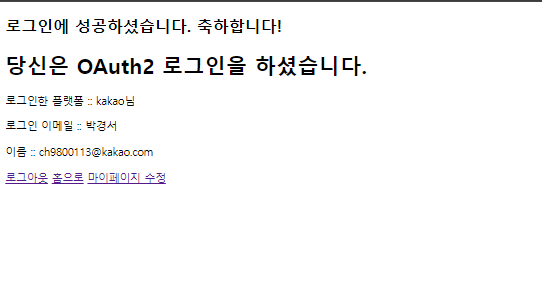
  • 해당 컨트롤러에서 /api/users/info앤트포인트의 값으로 화면이 보여질 것이다.


7. 로그인 폼 및 로그인 한 회원의 정보를 보여주기

  • loginform.html
<!DOCTYPE html>
<html>
<head>
    <meta charset="UTF-8">
    <title>로그인 페이지</title>
</head>
<body>
<h1>로그인 페이지</h1>
<hr/>
<!-- 시큐리티는 x-www-form-url-encoded 타입만 인식 -->
<form action="/login" method="post">
    <input type="text" name="username" />
    <input type="password" name="password" />
    <button>로그인</button>
</form>
<a href="/oauth2/authorization/kakao">카카오 로그인</a>
<a href="/oauth2/authorization/naver">네이버 로그인</a>
<a href="/oauth2/authorization/google">구글 로그인</a>
<a href="/api/users/signup">회원가입을 아직 하지 않으셨나요?</a>
</body>
</html>
  • info.html
  • OAuth2 로그인 후 보여지는 화면이다.
<!DOCTYPE html>
<html lang="en" xmlns:th="http://www.thymeleaf.org">
<head>
    <meta charset="UTF-8">
    <title>메인 홈 입니다.</title>
</head>
<body>
<h2>로그인에 성공하셨어요 축하합니다.</h2>
<h1> 당신은 OAUth2 로그인을 하셨습니다. </h1>
<p>안녕하세요, <span th:text="${name}"></span>님</p>
<p>안녕하세요, 당신이 로그인한 플랫폼 : <span th:text="${name.username}"></span>님</p>
<p>안녕하세요, 플랫폼 이름 : <span th:text="${name.name}"></span>님</p>
<p>안녕하세요, 당신의 등급 :  <span th:text="${name.authorities}"></span>님</p>
</body>
</html>
  • home.html
  • 일반 로그인 후 보여지는 화면이다.
<!DOCTYPE html>
<html lang="en" xmlns:th="http://www.thymeleaf.org">
<head>
    <meta charset="UTF-8">
    <title>메인 홈 입니다.</title>
</head>
<body>
<h2>로그인에 성공하셨어요 축하합니다.</h2>
<p>안녕하세요, 로그인 : <span th:text="${user.email}"></span>님</p>
<p>이름: <span th:text="${user.username}"></span></p>
</body>
</html>


이렇게 하면 기본 Oauth2 세션 로그인은 성공할 것이고 이제 여기에 jwt를 사용해서 구현해볼 것이다.

728x90
728x90

OAuth 2.0 이란?

서비스에서 사용자 개인정보와 인증에 대한 책임을 지지 않고 신뢰할 만한 타사 플랫폼에 위임
  • 개인정보 관련 데이터를 직접 보관하는 것은 리스크가 크며 보안적으로 문제되지 않도록 안전하게 관리해야 하고 ID/PW 에 관련된 지속적인 해킹 공격 등 여러 가지 신경써야 할 부분이 많음
  • 신뢰할 수 있는 플랫폼(구글, 페이스북, 네이버, 카카오 등)에 개인정보, 인증 기능을 맡기면 서비스는 인증 기능에 대한 부담을 줄일 수 있음


OAuth2 동작 방식

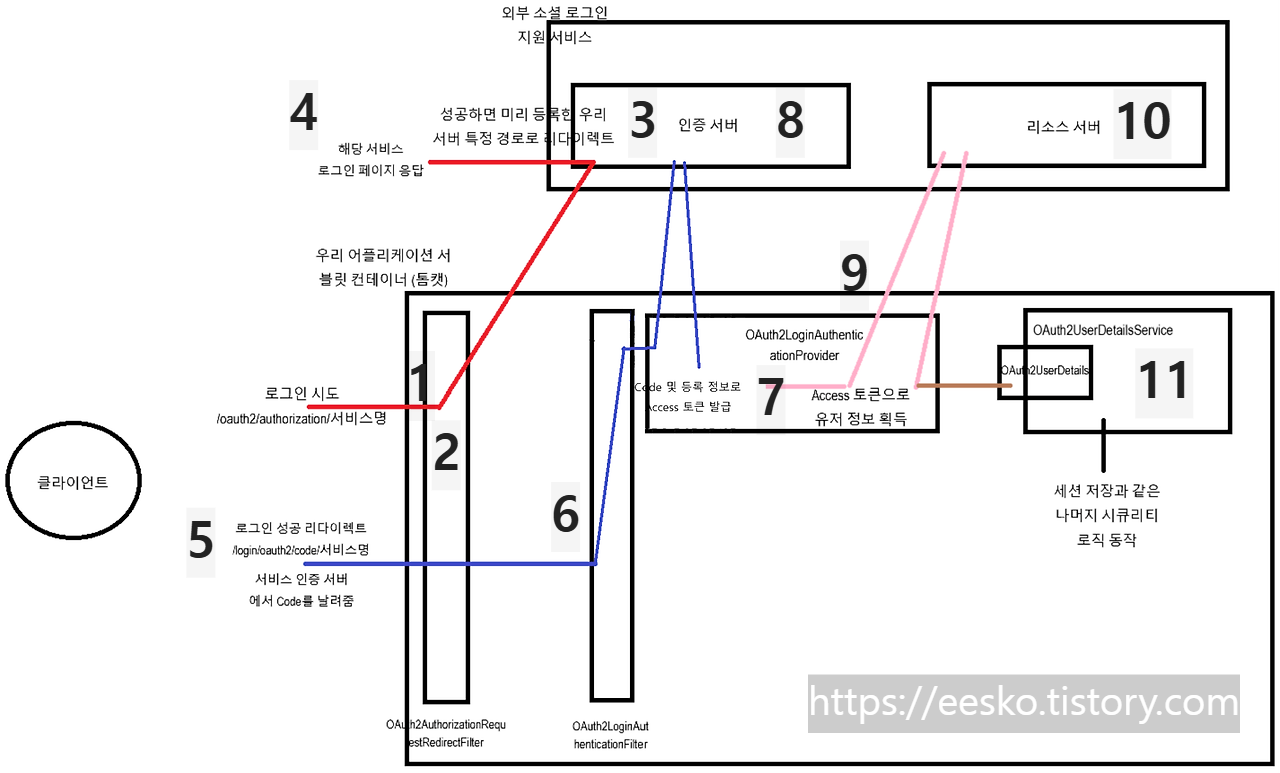
OAuth2 코드 방식 출처 : 3. 동작 원리 (devyummi.com)

저 사진에서 숫자대로 설명하겠다.


1. 사용자가 네이버, 카카오, 구글, 깃허브 등 로그인을 요구한다. 

2. 사용자의 요청을 OAuth2AuthorizationRequestRedirectFilter 에 의해서 첫 번째로 잡혀지게 된다. 그럼 그 요청을

3. 등록된 외부 소셜 로그인 지원서비스(네이버,카카오,구글,깃허브 등)의 인증서버에 도착하게 된다. 여기서 인증서버는 우리는 주소를 갖고있다.

4. 해당 서비스 로그인 페이지를 사용자에게 응답해준다. 네이버,카카오 로그인 창이 뜨는 것이다. 그럼 우리는 거기서 네이버나 카카오 같이 똑같이 로그인을 진행하는 것이다.

5. 로그인이 성공적으로 되면 3번에서 인증서버가 우리의 주소를 갖고있다고 했으니깐, 우리의 주소로 다시 리다이렉트된다. 이때 리다이렉트가 된다면 성공했다는 말과 함께 특정한 코드를 같이 날려준다.

6. OAuth2LoginAuthenticationFilter에서 해당 요청을 받게 된다. 그럼 이 필터는 뒷단인

7. OAuth2LoginAuthenticationProvider 클래스로 코드와 특정 정보를 넘겨준다. 

8. 그럼 네이버, 카카오 같은 인증 서버로 엑세스 토큰을 발급 받기위해 코드와 특정정보를 보낸다.

9. 엑세스 토큰을 받으면 코드는 소멸된다. OAuth2LoginAuthenticationProvider는 받은 엑세스 토큰을 사용하여 유저 정보를 획득하기 위해 네이버, 카카오와 같은 리소스 서버로 엑세스 토큰을 보내준다.

10. 리소스 서버는 받은 엑세스 토큰을 검증한 뒤로 유저 정보를 다시 돌려준다.

11. OAuth2UserDetailsService 에서 OAuth2UserDetails 객체로 부터 로그인을 마무리하고 등록되게 된다.


각각의 필터가 동작하는 주소 -- 관습

  • 위의 1번 과정에서 로그인을 시도할 때를 보면
  • OAuth2AuthorizationRequestRedirectFilter의 주소가 "/oauth2/authorization/서비스명" 인데 이것을 그대로 따르는 것이 좋다.
/oauth2/authorization/서비스명

// ex 
/oauth2/authorization/naver
/oauth2/authorization/google


  • 위의 5번 과정에서 로그인을 하고 나서 코드를 같이 날려준다고 했는데, 이때의 주소가 "/login/oauth2/code/서비스명" 인데 이것을 그대로 따라주자.
  • OAuth2LoginAuthenticationFilter : 외부 인증 서버에 설정할 redirect_uri 이다.
/login/oauth2/code/서비스명

// ex
/login/oauth2/code/naver
/login/oauth2/code/google
  • 모든 필터에 저 주소들이 디폴트 값으로 지정되어 있기 때문에 이런 관습을 따르는 것이 좋다.
  • 커스톰해서 사용은 가능한데.. 그냥 관습을 따르자.


OAuth2 인증 및 동작을 위한 변수들

  • 스프링에서 OAuth2 설정을 하면 특정 변수들만 설정을 해도
  • OAuth2AuthorizationRequestRedirectFilter → OAuth2LoginAuthenticationFilter → OAuth2LoginAuthenticationProvider 까지의 과정을 추가 설정하지 않아도 자동으로 진행한다.
  • 즉 우리는 가장 마지막 단계인 UserDetailsService, UserDetails 만 구현하면 된다.
  • 따라서 사용자는 UserDetailsServiceUserDetails만 구현하면 된다.


  • 위의 로직들이 동작하기 위해서 변수 설정이 필요하다고 했는데  .yml 파일에 등록할 값들이다. 
  • registration 은 필수 등록 해야 하는 정보고 provider 는 대형 사이트일수록 고정적으로 제공하기 때문에 그냥 그대로 가져다 쓰면 된다.
spring:
  security:
    oauth2:
      client:
        registration: -- [외부 서비스에서 우리 서비스를 특정하기 위해 등록하는 정보 : 필수] --
          kakao: -- [카카오] --
            client-id: -- [서비스에서 발급 받은 아이디] --
            client-secret: -- [서비스에서 발급 받은 비밀번호] --
            scope: --[리소스 서버에서 가져올 데이터 범위 >> 이메일, 닉네임, 아이디, 성별 등등 선택 가능] --
              - account_email
              - profile_nickname
            authorization-grant-type: authorization_code -- [코드 방식을 사용하기로 했으니] --
            redirect-uri: http://localhost:8080/login/oauth2/code/kakao --[서비스에 등록한 우리쪽 로그인 설공 url] --
            client-name: Kakao -- [서비스명] --
            client-authentication-method: client_secret_post

          naver:
            client-id: 3a_Puh_atCEjQRdro0ry
            client-secret: FyiSA5KCZP
            redirect-uri: http://localhost:8080/login/oauth2/code/naver
            client-name: Naver
            authorization-grant-type: authorization_code
            scope:
              - name
              - email

        provider: -- [이 부분은 변경없이 그대로 가져올 것] --
          kakao: -- [카카오] --
            authorization-uri: https://kauth.kakao.com/oauth/authorize -- [ 서비스 로그인 창 주소] --
            token-uri: https://kauth.kakao.com/oauth/token -- [토큰 발급 서버 주소] --
            user-info-uri: https://kapi.kakao.com/v2/user/me -- [ 사용자 정보 획득 주소] --
            user-name-attribute: id -- [응답 데이터 변수] --
          naver:
            authorization_uri: https://nid.naver.com/oauth2.0/authorize
            token_uri: https://nid.naver.com/oauth2.0/token
            user-info-uri: https://openapi.naver.com/v1/nid/me
            user_name_attribute: response


728x90

+ Recent posts